Labs / Trace and clean up
Trace and clean upBeta
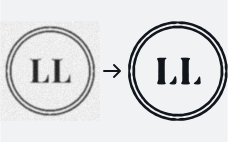
A blurry picture, traced into clean lines.
Drop a logo or drawing you only have as a small, soft picture and get lines a machine can use: the picture is straightened, lightened and sharpened, traced into smooth curves with the corners kept sharp, and fitted to your machine with bridges for stencils, thin lines widened and a size in millimetres. Check the lines against the picture before you export. The picture never leaves your browser.
Beta means new: the lines are checked by reading the files back, and have not yet been cut or engraved on a machine.
- Laser
- Pen plot
Open Trace and clean upFree to try; every Lab without a plan of its own: an export costs one export credit, or is included in Maker and every plan above it, like any other export. Pricing
What people make with it
- A customer’s blurry logo cut from acrylic
- A signature as a single plotted line
- A stencil with bridges for the inside of the O
- A sketch photographed on a table, straightened and engraved
The journey, in four steps
- Drop a picture. JPG, PNG or WebP, or a photo of a drawing. It stays on your device.
- Clean it. Straighten, lighten the shadows, sharpen and remove the noise.
- Trace it. Choose what you are making, how big, and how smooth the lines are; compare the lines with the picture.
- Fit and export. Bridges for stencils, thin lines fixed, a kerf; then SVG, DXF, a LightBurn project, a PDF and a preview.
Clean lines in millimetres as SVG, DXF, a LightBurn project and a PDF, fitted to your machine, or sent on to the Logo maker.
What a good trace looks like
- Faithful: the lines cover the same ink as the picture, and the Overlay shows you where they do not.
- Smooth where the picture is smooth, sharp where it is sharp: corners stay corners, curves use few points.
- Quiet: dust, blocks and pinholes from a JPEG are gone, and edges do not step along the pixels.
- Closed and nested the right way: every inner part is a hole, so any laser or cutter reads it the same.
Made right for your machine
- Stencils get bridges, so the inside of an O or a B does not fall out.
- Lines thinner than your machine holds are widened; gaps too small to cut are closed.
- The kerf is allowed for, an outline can be added, and a stamp is mirrored for you.
- Every starting number is a guess until you cut a test piece: say what held and change it.
What you get
Clean lines in millimetres as SVG, DXF, a LightBurn project and a PDF, fitted to your machine, or sent on to the Logo maker.
You confirm you have the right to use the picture you trace. Tracing here does not register a mark or check that nobody else uses it. Pricing is the same as every export: pricing.
Drop a picture.
All Labs · Slice a 3D model · Night sky · Line art from a photo · Sundial and sun path · Ski Lab · Mosaic Lab · Logo maker · Design Lab · Product Lab · Learn